
Table of Contents
ToggleSmart appliances have moved beyond gimmicks, they’re now solving real kitchen challenges. Family Hub refrigerators represent one of the most functional upgrades in home tech, combining traditional cooling with interactive displays, internal cameras, and connectivity features that help manage groceries, meal planning, and family communication. These aren’t your typical fridges with an ice maker upgrade: they’re full-featured smart hubs designed to sit at the center of a connected kitchen. For homeowners considering a kitchen remodel or appliance replacement, understanding what these refrigerators offer, and what they demand in terms of space, power, and budget, is essential before making the investment.
Key Takeaways
- Family Hub refrigerators combine a 21.5-inch touchscreen, interior cameras, and Wi-Fi connectivity to create a smart kitchen command center that manages inventory, meal planning, and family communication.
- A strong Wi-Fi signal is essential for optimal performance; kitchens with weak signal strength should install a mesh network to avoid connectivity issues and lag.
- These premium units cost $2,800–$4,500+, significantly more than standard refrigerators, so they’re best suited for busy families with multiple schedules or households already invested in smart home ecosystems.
- Interior cameras help reduce duplicate grocery purchases and food waste by allowing remote inventory checks, but they work best with organized, labeled storage and clear containers.
- Annual energy costs average $96–$120, and software support is typically guaranteed for only five years, so consider long-term technology obsolescence before investing in a Family Hub refrigerator.
What Is a Family Hub Refrigerator?
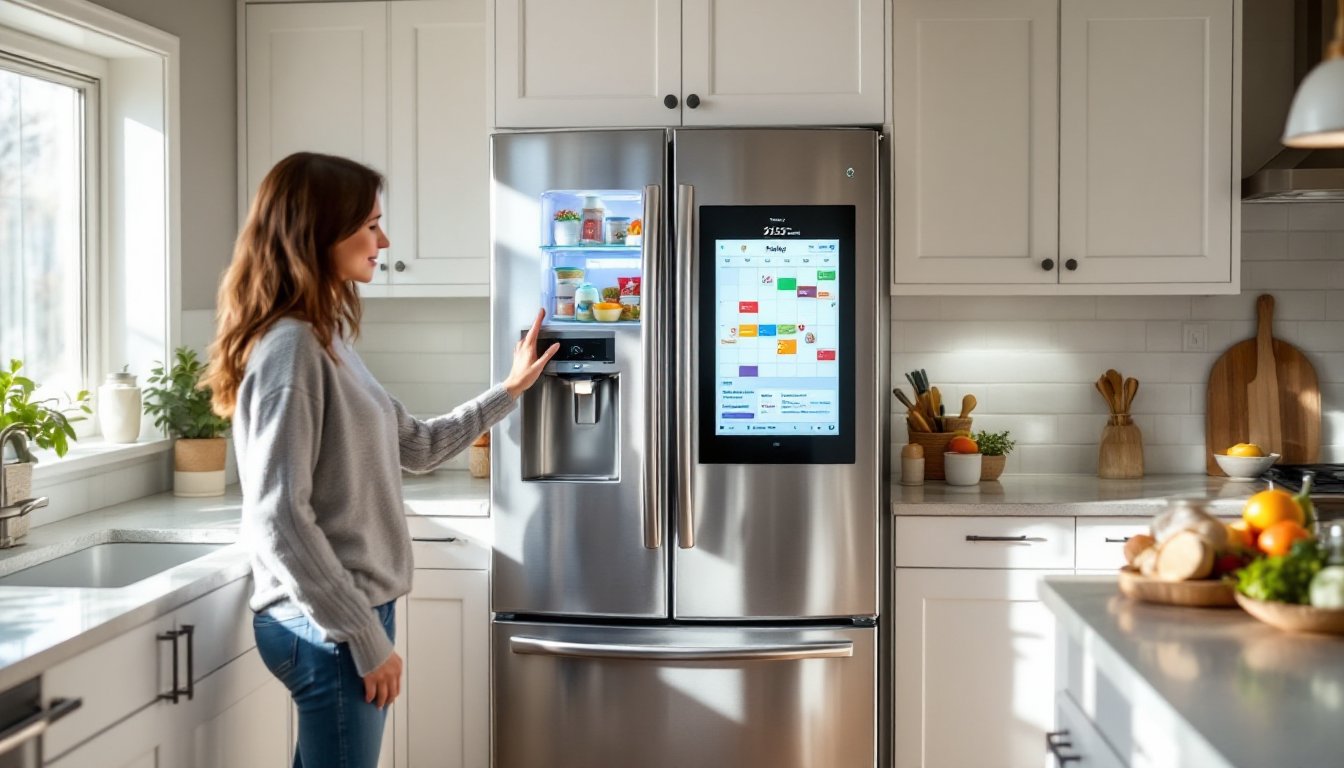
A Family Hub refrigerator is a smart appliance that integrates a large touchscreen display (typically 21.5 inches) directly into the refrigerator door, paired with Wi-Fi connectivity, internal cameras, and app-based controls. The concept originated with Samsung, which launched the first Family Hub model in 2016 and has since dominated this niche category.
Unlike basic smart fridges that only send alerts when the door is left open, Family Hub models function as kitchen command centers. Users can view what’s inside the fridge remotely via smartphone, stream music or video, mirror their phone screens, leave digital notes for family members, and even order groceries through integrated shopping apps.
The hardware includes three interior cameras mounted inside the fridge compartment that snap photos each time the door closes. These images sync to a mobile app, letting users check their inventory from the grocery store without guessing whether they’re out of milk. The touchscreen runs on a custom OS (Tizen for Samsung models) and supports third-party app integration for calendars, recipes, meal planning services, and smart home controls.
From a structural standpoint, these units are typically French-door or four-door configurations with bottom freezers. Standard widths run 35.75 to 36 inches, requiring a cabinet opening that accommodates both the unit and door swing clearance. Depths range from counter-depth (around 24-27 inches excluding handles) to full-depth models (30+ inches), which can protrude several inches beyond standard cabinetry.
Key Features That Make Family Hub Refrigerators Stand Out
Touchscreen Display and Smart Capabilities
The defining feature is the 21.5-inch LCD touchscreen embedded in the right-hand door panel. It’s a capacitive display similar to a tablet, responsive to touch and swipe gestures. The screen remains on in ambient mode, showing the time, weather, or family photos, and wakes fully when tapped.
Core functions include:
- Digital whiteboard and notes: Families can leave messages, create shared to-do lists, or post reminders directly on the display. Handwriting recognition works, but typing via on-screen keyboard is faster.
- Photo frame mode: Syncs with cloud photo services (Google Photos, Samsung Cloud) to rotate images. It’s a functional use of the screen when not actively in use.
- Streaming media: Supports Spotify, Pandora, and select video apps. Audio quality from built-in speakers is adequate for background music but won’t replace a dedicated speaker.
- Smart home hub: Integrates with SmartThings (Samsung’s platform), Ring doorbells, Nest thermostats, and other connected devices. Users can view doorbell cameras or adjust lighting without leaving the kitchen.
- Recipe and meal planning apps: Pre-loaded apps suggest recipes based on ingredients detected by the cameras (though accuracy depends on how you organize your fridge). Some models tie into grocery delivery services for one-tap reordering.
Performance note: The display requires a strong 2.4 GHz or 5 GHz Wi-Fi signal. Kitchens located far from routers may experience lag or connectivity drops. Consider router placement or a mesh network if your kitchen is in a signal weak spot, similar to recommendations for other smart home devices.
Interior Cameras and Food Management
Family Hub units include three wide-angle cameras positioned inside the refrigerator compartment. Each time the fridge door closes, the cameras capture updated images of the shelves. These photos upload to the Family Hub mobile app, viewable on a smartphone from anywhere.
Practical uses:
- Remote inventory checks: Useful when shopping or meal planning away from home. No more duplicate purchases or forgotten items.
- Expiration tracking: Newer models use AI to recognize common items (eggs, milk, produce) and estimate freshness. Users can manually tag items with expiration dates for custom tracking.
- Voice integration: Works with Bixby, Alexa, and Google Assistant. Users can ask, “What’s in my fridge?” and receive a verbal rundown.
Limitations to know: Camera quality is decent but not professional-grade. Crowded or disorganized shelves reduce recognition accuracy. Items stored in opaque containers or at odd angles may not register. The system works best when users adopt organized storage habits, clear bins, labels, and consistent placement.
The cameras don’t monitor the freezer compartment on most models, only the refrigerator section. Battery life for the app depends on sync frequency: real-time notifications drain phone batteries faster than scheduled updates.
Is a Family Hub Refrigerator Worth the Investment?
Family Hub refrigerators carry a significant premium over standard models. As of 2026, base prices start around $2,800 to $3,200 for entry-level Family Hub units and climb to $4,500 or more for larger-capacity, feature-rich configurations. By comparison, high-quality non-smart French-door refrigerators in the same size range run $1,800 to $2,500.
The value proposition depends on household habits and priorities:
Who benefits most:
- Busy families juggling multiple schedules, meal prep, and grocery management. The shared calendar and notes features reduce missed appointments and duplicate shopping trips.
- Tech-forward households already invested in smart home ecosystems (SmartThings, Alexa, Google Home). Integration adds genuine convenience when controlling lights, cameras, and thermostats from one spot.
- Frequent entertainers who use the kitchen as a social hub. Streaming music, displaying recipes, or showing photos during gatherings adds a functional touch.
Who should reconsider:
- Budget-conscious renovators: The upfront cost differential is steep, and the technology may become outdated faster than the refrigerator’s mechanical lifespan (typically 10-15 years). Software updates eventually cease, leaving the display functional but limited.
- Minimalists or those with simple cooking routines: If grocery shopping is infrequent and meal planning is straightforward, the cameras and apps offer little advantage over a notepad and phone.
- Households with unstable Wi-Fi or limited tech adoption: A fridge that depends on connectivity loses core functions during outages. If household members won’t engage with the tech, it’s wasted capacity.
Operating costs to factor in: Energy consumption for Family Hub models averages 600-750 kWh/year, slightly higher than comparable non-smart models due to the display and cameras. At the national average of $0.16 per kWh, expect an annual cost of $96 to $120. The touchscreen adds negligible power draw in standby mode but runs continuously.
French-door refrigerators in general offer excellent storage flexibility, and Family Hub models maintain that advantage while layering on connectivity.
Resale and longevity: Smart appliances can be a selling point during home sales, particularly in tech-savvy markets. But, outdated software or non-functional apps (if the manufacturer discontinues support) may hurt resale value. Samsung has committed to at least five years of software updates for models released after 2023, but long-term support beyond that is uncertain.
Installation and Kitchen Integration Tips
Installing a Family Hub refrigerator follows standard appliance installation protocols with a few smart-specific considerations.
Measure twice, order once:
- Width: Verify cabinet opening is at least 36 inches wide (most models require 35.75 inches minimum). Account for trim or filler strips if replacing a smaller unit.
- Height: Standard height is 70 inches with hinges, but confirm clearance if upper cabinets or soffits are present. Leave 1 inch of clearance at the top for ventilation and hinge operation.
- Depth: Counter-depth models (24-27 inches deep, excluding handles) sit flush with standard 24-inch-deep base cabinets. Full-depth models (30+ inches) will protrude. Measure from the wall to the front edge of countertops, not just cabinet depth.
- Door swing: French doors require 90-degree swing clearance on each side. Check for interference from islands, walls, or adjacent appliances. The right door (with the touchscreen) may be heavier and require slightly more clearance.
Electrical and connectivity:
- Family Hub refrigerators use a standard 115V, 15-amp grounded outlet. No special wiring is required, but the outlet should be dedicated (not shared with high-draw appliances like microwaves).
- Wi-Fi signal strength is critical. Test signal strength at the install location using a smartphone before delivery. Aim for at least three bars of signal or a download speed above 10 Mbps. If signal is weak, install a mesh network node in or near the kitchen.
- Water line (if ice/water dispenser is included): Requires a 1/4-inch copper or braided stainless supply line connected to a shutoff valve. Most jurisdictions don’t require a permit for this connection, but verify local plumbing codes. Use a saddle valve only as a last resort, compression fittings are more reliable.
Delivery and positioning:
Delivery teams typically handle placement, but confirm they’ll remove packaging, level the unit, and test the water line connection. Check the installation manual for minimum clearances: typically 1 inch at the top, 1/2 inch on sides, and 2 inches at the rear for airflow around condenser coils.
If installing yourself (not recommended due to size and weight, most units exceed 300 pounds), recruit at least two helpers and use an appliance dolly. Protect flooring with cardboard or moving blankets. Leveling is essential for proper door closure and drainage: adjust front leveling legs until a bubble level reads true side-to-side and front-to-back.
First-time setup:
After plugging in, allow the fridge to reach temperature (37°F for the refrigerator, 0°F for the freezer) before loading food, usually 4-6 hours. During this time, complete the touchscreen setup:
- Connect to your Wi-Fi network (2.4 GHz or 5 GHz).
- Download the SmartThings app (or equivalent for non-Samsung models) on your smartphone.
- Create or log into a Samsung account to enable remote camera access.
- Calibrate the interior cameras by following the on-screen prompts (usually involves placing recognizable items on each shelf).
- Link any third-party accounts (Spotify, calendar, smart home devices).
You can find more kitchen integration ideas and appliance layout tips at The Kitchn, which covers appliance placement alongside design considerations.
Maintenance access:
Ensure you can pull the refrigerator forward for service. Condenser coils (usually at the bottom rear or behind a front grille) need vacuuming every 6-12 months to maintain efficiency. Water filters require replacement every six months (models use proprietary filters: stock spares). Touchscreen cleaning is straightforward, use a microfiber cloth dampened with water or screen cleaner, never abrasive chemicals.
Conclusion
Family Hub refrigerators deliver tangible convenience for households that will actively use the smart features, remote cameras, shared calendars, and integrated controls justify the premium when they align with daily routines. But they’re not essential appliances. Homeowners should weigh the upfront cost against long-term usability and the likelihood of tech adoption across the household. If the features fit your kitchen workflow and budget allows, they’re a solid upgrade. If you’re satisfied with a notepad and phone reminders, a quality standard refrigerator will serve just as well for far less money.