
Table of Contents
ToggleProperty security doesn’t always require expensive cameras or hardwired alarm systems. For homeowners looking to monitor long driveways, side gates, or remote access points, a wireless driveway alarm offers a practical, DIY-friendly solution. The Guardline wireless driveway alarm has become a go-to choice for rural properties, suburban homes with extended driveways, and anyone who wants to know when a vehicle or visitor approaches. Unlike traditional motion sensors that require complex wiring or professional installation, Guardline systems run on batteries and communicate wirelessly, making them accessible for most DIYers. This guide covers everything from setup and sensor placement to real-world performance and troubleshooting.
Key Takeaways
- The Guardline driveway alarm is a wireless, battery-powered detection system using PIR motion sensors that communicate wirelessly up to 500 feet, making it an affordable DIY alternative to hardwired alarm systems.
- Installation requires no electrical work or professional help—simply plug in the receiver indoors, insert batteries into sensors, pair them wirelessly, and mount sensors 3–4 feet high perpendicular to your driveway for optimal coverage.
- Mount Guardline sensors 10–15 feet from the driveway edge, away from reflective surfaces and heat sources, and test performance in real conditions (morning, afternoon, and night) to account for weather and temperature effects.
- Real-world range typically reaches 300–500 feet depending on obstructions, interference, and weather; forests and metal roofs reduce range more than open terrain.
- Common issues like non-triggering sensors or false alarms are resolved through battery checks, sensitivity adjustments, lens cleaning, and strategic sensor repositioning away from heat sources and busy roads.
- The Guardline system works best for long rural driveways, multi-entry properties, and budget-conscious homeowners seeking perimeter awareness, but isn’t suitable for urban high-traffic areas or applications requiring video verification.
What Is the Guardline Driveway Alarm and How Does It Work?
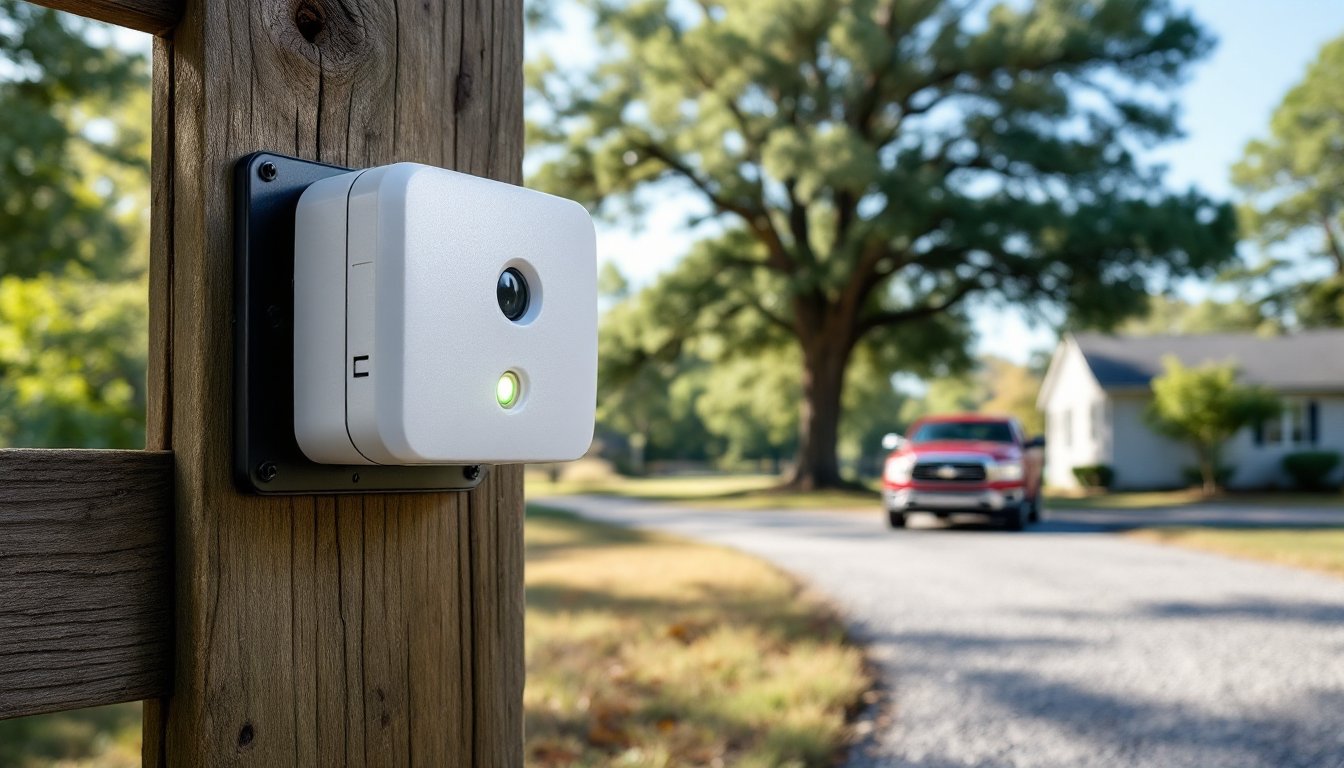
The Guardline driveway alarm is a wireless detection system consisting of one or more motion sensors and a plug-in receiver. When the sensor detects movement, typically via passive infrared (PIR) technology, it sends a radio signal to the receiver, which emits an audible chime or alarm. Most Guardline models operate on the 433 MHz frequency, providing a range of up to 500 feet in open terrain (less in wooded or built-up areas).
The sensors are weatherproof and battery-powered, usually requiring four C or D batteries depending on the model. Battery life averages 3–6 months under normal use, though cold temperatures and frequent triggers can shorten this. The receiver plugs into a standard 120V outlet and offers adjustable volume settings and multiple chime tones.
Unlike beam-style sensors that detect when a laser or infrared beam is broken, PIR sensors respond to heat signatures in motion. This makes them effective for detecting vehicles, people, and large animals but less prone to false alarms from wind-blown branches. But, direct sunlight, reflective surfaces, and small wildlife can occasionally cause triggers. Understanding this distinction helps when choosing sensor placement and adjusting sensitivity settings.
Key Features That Make Guardline Stand Out
Guardline systems offer several features that appeal to DIYers and homeowners managing long or multi-entry properties:
- Expandable system: Most models support up to 16 sensors on a single receiver, allowing coverage of multiple driveways, gates, or pathways. Each sensor can be programmed with a distinct chime tone, so users know which entry point triggered the alert.
- Weatherproof housing: Sensors are rated IP65 or higher, meaning they withstand rain, snow, and dust. The housing is UV-resistant plastic, though prolonged exposure to harsh sun can degrade battery life and sensor accuracy over time.
- Adjustable sensitivity: A dial or switch on most sensors lets users tune detection range (typically 20–40 feet) and angle. This helps reduce false triggers from passing cars on adjacent roads or neighborhood pets.
- Battery-powered operation: No trenching for cables or hiring an electrician. Sensors run on C or D batteries, and the receiver plugs into any indoor outlet.
- Visual and audible alerts: Many Guardline receivers include an LED indicator plus to the chime, helpful in noisy workshops or for users with hearing impairments.
Compared to hardwired systems or professional-grade security setups, Guardline sacrifices some features, like smartphone integration or cloud recording, but gains simplicity and cost-effectiveness. When expert reviews of top driveway alarms evaluate wireless options, ease of installation and expandability consistently rank as top priorities for DIY users.
Installation Guide: Setting Up Your Guardline System
Setting up a Guardline driveway alarm requires no electrical work or permits, but thoughtful placement and testing are critical.
Tools and materials needed:
- Guardline sensor(s) and receiver
- Mounting bracket and screws (included)
- Drill with 3/16″ bit (for masonry or wood)
- Level
- Fresh batteries (C or D, depending on model)
- Screwdriver (Phillips or flathead, depending on hardware)
Step-by-step installation:
- Plug in the receiver indoors. Choose a central location where you’ll hear the chime. Avoid placing it near metal objects, Wi-Fi routers, or thick concrete walls that can interfere with the 433 MHz signal.
- Insert batteries into the sensor. Most units power on automatically. An LED on the sensor will blink to confirm power.
- Sync the sensor to the receiver. Press and hold the pairing button on the receiver (usually located on the back or side) until the LED flashes. Then press the test button on the sensor. The receiver should emit a chime, confirming the connection.
- Test the detection range. Walk in front of the sensor at various distances and angles. Adjust the sensitivity dial as needed.
- Mount the sensor. Use the included bracket to attach the sensor to a tree, fence post, or wall. Position it 3–4 feet off the ground, angled slightly downward. This height balances vehicle and pedestrian detection while minimizing false triggers from ground-level critters.
- Secure wiring and weatherproofing. Ensure the battery compartment seal is tight. If mounting to a tree, use stainless steel screws or straps to avoid rust.
Choosing the Right Sensor Placement for Maximum Coverage
Sensor placement determines system effectiveness. For driveway monitoring, mount the sensor perpendicular to the traffic path, not facing straight down the driveway. PIR sensors detect motion across their field of view more reliably than motion directly toward or away from the lens.
Key placement tips:
- Position sensors 10–15 feet from the driveway edge. Closer placement risks missing slow-moving vehicles: farther placement reduces detection reliability.
- Avoid aiming sensors toward reflective surfaces (windows, metal siding) or heat sources (air conditioner compressors, dryer vents). These cause false alarms.
- For long driveways, install sensors in stages. Place one near the street entrance and another closer to the house, using different chime tones to indicate which zone was triggered.
- In wooded areas, clear low brush within the sensor’s 40-foot detection cone. Overhanging branches are usually fine, but dense undergrowth can block the infrared beam.
- Test in real conditions. Walk, drive, and even ride a bike through the detection zone at different times of day. Morning dew, afternoon sun, and nighttime temperature drops all affect PIR performance.
If the property has multiple entry points, consider how many sensors the receiver can handle and whether distinct chimes will be useful. Some homeowners assign a two-tone chime to the main driveway and a single tone to a side gate, for example.
Real-World Performance: Range, Accuracy, and Reliability
Guardline advertises a 500-foot wireless range, but real-world results vary. Open fields with minimal obstacles deliver the best performance, users report reliable alerts at 400–500 feet. Forested properties, hilly terrain, and homes with metal roofs or thick masonry walls often see range drop to 200–300 feet.
Factors affecting range:
- Obstructions: Trees, buildings, and vehicles between sensor and receiver weaken the signal. The 433 MHz frequency doesn’t penetrate dense materials as well as higher-frequency systems.
- Interference: Cordless phones, baby monitors, and other devices using similar frequencies can cause dropped signals or phantom alerts. If interference is an issue, try relocating the receiver or switching chime tones (some Guardline models let you cycle through frequencies).
- Weather: Heavy rain and snow slightly reduce range but rarely disable the system. Extreme cold (below 0°F) shortens battery life and can slow sensor response time.
Detection accuracy is generally high for vehicles and adult pedestrians. Large dogs and deer occasionally trigger the sensor, especially if they linger in the detection zone. Small animals like squirrels or cats rarely cause alerts unless they move directly in front of the lens at close range.
Many independent evaluations of the best driveway alarms highlight Guardline’s balance of affordability and functionality, though reviewers note the lack of smartphone connectivity limits its appeal for tech-focused users. For homeowners prioritizing simplicity over app integration, this tradeoff works well.
Common Issues and Troubleshooting Tips
Even straightforward systems encounter occasional hiccups. Here’s how to address the most common Guardline problems:
Sensor not triggering:
- Check battery voltage. Weak batteries cause intermittent performance before total failure.
- Verify the sensor LED blinks when you walk past. If not, re-sync the sensor to the receiver.
- Adjust sensitivity. If set too low, the sensor may miss slow-moving targets.
- Clear obstructions. Spider webs, dirt, or condensation on the lens reduce detection accuracy.
Receiver not chiming:
- Confirm the receiver is plugged in and powered on (most have a small LED indicator).
- Check volume setting. Some models have a rotary dial that can be accidentally turned down.
- Re-sync the sensor. Power cycle both units by removing batteries and unplugging the receiver for 30 seconds.
- Test for interference. Unplug other wireless devices temporarily to see if performance improves.
False alarms:
- Reduce sensor sensitivity or narrow the detection angle.
- Relocate the sensor away from heat sources, reflective surfaces, or busy roads.
- Trim vegetation within the detection zone, especially tall grass or low branches that sway in wind.
Short battery life:
- Cold weather accelerates battery drain. In winter climates, expect 2–3 months instead of 6.
- High traffic areas trigger the sensor frequently, depleting batteries faster. Consider lithium batteries for extended life in cold or high-use conditions.
- Ensure the battery compartment is sealed. Moisture intrusion corrodes contacts and drains power.
Limited range:
- Reposition the receiver to a more central location or closer to the sensor.
- Avoid placing the receiver near large metal objects (refrigerators, file cabinets) that block radio signals.
- Add a second receiver if the property is large. Some Guardline models support multiple receivers paired to the same sensors.
If problems persist after troubleshooting, contact Guardline support. Most units carry a one-year warranty covering defects but not damage from improper installation or environmental exposure.
Best Use Cases for Homeowners and DIY Enthusiasts
The Guardline driveway alarm shines in specific scenarios where wireless, battery-powered monitoring makes sense:
Long rural driveways: Properties with 200+ foot driveways benefit from early alerts when vehicles approach, especially useful for home businesses, deliveries, or security-conscious homeowners. Pairing the system with outdoor lighting creates a layered security approach.
Multi-entry properties: Farms, hobby ranches, and large lots with side gates or back access roads can use multiple sensors with distinct chimes to identify which entry point is active. This beats constantly checking cameras or walking the property.
Temporary or seasonal monitoring: Because the system requires no wiring, it’s ideal for vacation homes, RVs, or job sites. Install it in spring, remove it in fall, and store it indoors without leaving permanent hardware behind.
Workshop or garage alerts: Homeowners with detached workshops appreciate knowing when someone enters the driveway, especially if they work with loud tools and can’t hear approaching vehicles. The visual LED on the receiver adds a helpful cue.
Budget-conscious security: At a fraction of the cost of professionally installed systems, Guardline provides basic intrusion detection without monthly fees or complex setup. It won’t replace a full security system, but it fills the gap for perimeter awareness.
Not ideal for:
- Urban properties with heavy foot traffic: Constant pedestrian movement on sidewalks or adjacent driveways causes nuisance alerts.
- Areas requiring video verification: If you need recorded evidence of activity, a camera-based system is better.
- Critical security applications: Guardline lacks tamper alerts, encrypted signals, or professional monitoring. For high-risk properties, invest in a supervised alarm system.
Many home safety product reviews emphasize matching the tool to the task. For perimeter awareness and visitor alerts, Guardline delivers solid performance. For comprehensive security, it’s one component of a broader strategy that might include lighting, cameras, and smart locks.
When choosing a driveway alarm, consider how much property you need to cover, whether you need multiple sensors, and how important wireless flexibility is versus hardwired reliability. Guardline’s expandable, battery-powered design serves DIYers well, provided expectations align with what a sub-$100 system can realistically deliver.