
Table of Contents
ToggleWhen a $400-plus vacuum quits mid-clean, it’s frustrating. But most Dyson issues aren’t warranty-worthy failures, they’re maintenance gaps or simple mechanical hang-ups that homeowners can fix in under ten minutes. Whether it’s weak suction, a flashing battery light, or a brush bar that won’t spin, the good news is that Dyson engineers built these machines with user serviceability in mind. Most filter housings, bins, and brush bars pop off without tools. This guide walks through the six most common Dyson vacuum problems, the real-world causes behind them, and the step-by-step fixes that get you back to cleaning.
Key Takeaways
- A clogged filter is the leading cause of weak suction in Dyson vacuums; wash filters monthly under cold water and air-dry for 24 hours to restore airflow.
- Dyson vacuum troubleshooting should follow a logical sequence: check airflow (filter, bin, hose), then power (charger contacts, battery age), then mechanical components like brush bars.
- Blockages account for 70% of Dyson service calls; systematically inspect the cleaner head inlet, wand, and cyclone to clear obstructions before they trigger thermal shutoffs.
- Lithium-ion batteries in cordless models last 300–500 charge cycles (3–5 years), and OEM replacement packs cost $80–$130, making battery replacement the most cost-effective repair after year three.
- Motor pulsing or cutting out is a safety feature triggered by restricted airflow or a jammed brush bar; clear blockages and allow 20–30 minutes for the motor to cool before resuming use.
- A burning smell requires immediate attention as it signals motor overheating; stop use, clear all clogs and jams, and let the vacuum cool before troubleshooting further.
Why Your Dyson Vacuum Has Lost Suction Power
Weak suction is the number-one complaint with any bagless vacuum, and Dyson models are no exception. The cyclone design is only as good as the airflow it receives, and that airflow depends on a clear, unobstructed path from the floor head to the bin.
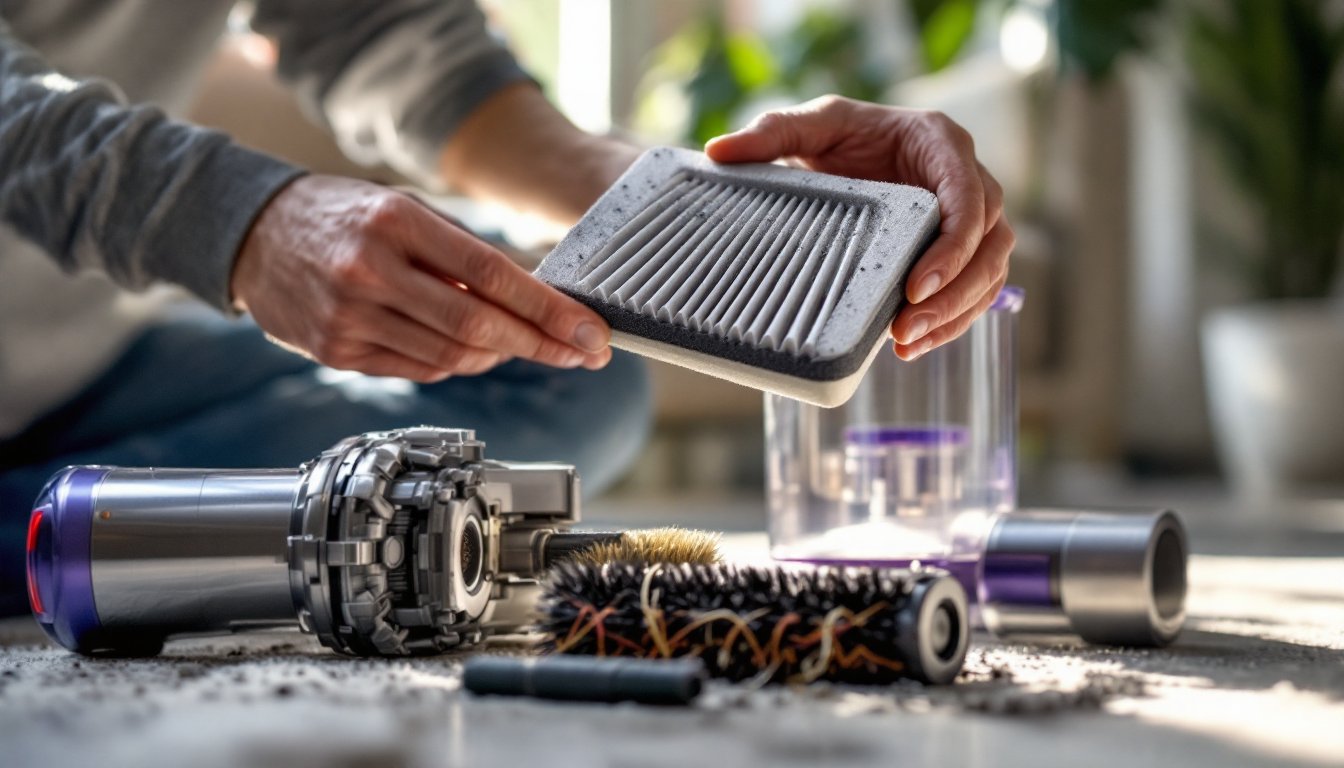
Start with the filter. All Dyson cordless and upright models use washable lifetime filters, but “lifetime” assumes you actually wash them. A clogged filter chokes airflow before it even reaches the motor. Remove the filter (usually behind the bin or near the motor housing), rinse it under cold tap water until the water runs clear, then let it air-dry for 24 hours minimum. Don’t speed-dry with a hairdryer or radiator, heat warps the foam and pleats. Mark your calendar to repeat this every 30 days if you have pets or high dust.
Check the bin and seals. If the clear bin is packed past the MAX line, suction drops sharply. Empty it when debris hits two-thirds full. Also inspect the rubber gasket where the bin meets the cyclone assembly, cracks or dust buildup here create air leaks that kill suction. Wipe the gasket with a damp cloth.
Inspect the wand and hose. Flex the hose and look down the wand under a flashlight. Hair, dryer sheets, and pet toys are common culprits. If you spot a clog, disconnect the wand and push it out with a broom handle or use a straightened wire coat hanger. Many home maintenance checklists recommend inspecting vacuum hoses quarterly, especially if you vacuum high-traffic or pet areas daily.
Dyson Won’t Turn On or Charge: Battery and Power Issues
If your cordless Dyson won’t power up or the battery drains in under five minutes, you’re likely dealing with a battery or charging circuit issue. Dyson cordless vacuums use lithium-ion battery packs rated for roughly 300–500 charge cycles (about 3–5 years of regular use), after which capacity falls off a cliff.
Test the charger first. Plug the charger into the wall dock or directly into the vacuum. A solid blue light indicates charging: a flashing blue or amber light signals a temperature fault or connection error. Unplug the charger, wait 10 seconds, and reconnect. If the light still flashes, the battery may be too hot or too cold, let the vacuum sit at room temperature (65–75°F) for an hour before trying again.
Check for firmware or blockage faults. Some V-series models (V10, V11, V15) have onboard diagnostics. A flashing red light often indicates a blockage triggering a thermal cutoff, not a battery failure. Clear any obstructions and let the motor cool for 30 minutes. If the vacuum still won’t charge, inspect the charging contacts on both the dock and the vacuum body, clean any dust or corrosion with rubbing alcohol on a cotton swab.
Battery replacement. If the battery is more than four years old or shows visible swelling, it’s time to replace it. Dyson sells OEM replacement packs (around $80–$130 depending on model), and installation is usually two screws with a Phillips-head. Avoid third-party knockoff batteries, voltage mismatches can fry the motor controller. Homeowners dealing with common Dyson vacuum malfunctions often find that battery replacement is the single most cost-effective repair after the three-year mark.
Fixing a Dyson That Keeps Stopping or Pulsing
If your Dyson runs for a few seconds, then cuts out or pulses on and off, the motor is likely entering thermal protection mode due to restricted airflow or an overstressed brush bar. This is a safety feature, not a defect.
First, rule out blockages. Follow the steps in the suction section above, check the filter, bin, wand, hose, and cleaner head inlet. Even a partial clog can cause pulsing. Remove the cleaner head and look into the neck where it connects to the wand. Hair wraps and small debris often hide here.
Examine the brush bar. If the brush bar is jammed with hair, string, or carpet fibers, the motor has to work harder to spin it, which triggers the thermal cutoff. Flip the cleaner head over, release the red or purple locking clips (tool-free on most models), and lift out the brush bar. Use scissors to cut away any hair wound around the bristles and bearing caps. Wipe the bearings clean.
Let the motor cool. If you’ve been vacuuming for 20+ minutes straight on MAX or Boost mode, the motor may simply be too hot. Power off, set the vacuum upright, and wait 20–30 minutes. Pulsing usually stops once the internal thermostat resets. Avoid back-to-back extended runs on high power, most Dyson cordless models are designed for 10–15 minute bursts, not whole-house marathons on turbo.
How to Clear Blockages in Your Dyson Vacuum
Blockages account for roughly 70% of Dyson service calls, and most are in predictable choke points. Here’s a systematic approach to finding and clearing them.
Disconnect power. Unplug corded models or remove the battery on cordless units before disassembly. This prevents accidental startup and protects the motor from damage if you dislodge debris into the cyclone.
Work from floor head to bin. Start at the cleaner head inlet. Remove the head (press the red button near the neck), shine a flashlight up into the wand connection, and look for obstructions. Next, detach the wand from the main body and inspect both ends. Finally, remove the bin and check the cyclone inlet, this is where small toys, coins, and socks usually lodge.
Use the right tools. A wooden dowel, broom handle, or stiff wire works for wand clogs. For cyclone blockages, a small bottle brush or pipe cleaner is safer than metal tools that can scratch the plastic and create future snag points. Never use compressed air, it can blow fine dust into the motor housing.
Reassemble and test. After clearing all debris, reassemble in reverse order, making sure all clips and seals lock into place. Run the vacuum on a clear floor for 30 seconds to confirm airflow is restored. Experts covering comprehensive Dyson vacuum fixes emphasize that monthly preventive checks catch blockages before they cause motor strain.
Resolving Brush Bar Problems and Spinning Issues
A non-spinning brush bar kills cleaning performance on carpets and area rugs. On most Dyson models, the brush bar is driven by a small electric motor inside the cleaner head, separate from the main suction motor.
Check for obstructions first. Hair, thread, and rubber bands wrap around the brush bar shaft and bearings, creating enough friction to stall the motor. Remove the brush bar (see pulsing section above) and clean thoroughly. Pay special attention to the end caps, hair often packs in tight around the bearings.
Test the motor. With the brush bar removed, turn on the vacuum and switch to carpet mode. You should see the drive belt or motor post spinning inside the cleaner head. If it’s not moving, the issue is electrical, either a broken wire, a tripped motor, or a faulty mode switch. On V-series cordless models, make sure you’re pressing the floor mode button to activate the brush bar: it doesn’t run automatically on hard floors to save battery.
Inspect the drive belt (corded models). Older Dyson uprights (DC series) use a rubber belt to drive the brush bar. Over time, belts stretch, crack, or slip off the pulley. If the belt is loose or broken, order a replacement belt kit (around $8–$15). Installation takes about five minutes: remove the sole plate screws, loop the new belt over the motor shaft and brush bar, then snap the bar back into place.
Reset the cleaner head. Some V11 and V15 models have a torque sensor that disables the brush bar if resistance is too high. After clearing hair and debris, hold the power button for 10 seconds to reset the sensor. The brush bar should resume normal operation.
Strange Noises and Smells: What They Mean and How to Fix Them
Unusual sounds or odors from a vacuum usually point to mechanical wear, debris interference, or a clogged filter forcing the motor to overheat.
High-pitched squealing or whistling indicates air leaking through a crack or loose seal. Check the bin gasket, cyclone assembly, and wand connections. Tighten any loose fittings or replace damaged seals. Dyson sells seal kits for most models.
Grinding or rattling suggests something hard (screw, pebble, plastic toy) is stuck in the cleaner head, wand, or cyclone. Power off immediately and inspect all sections. Continued operation can crack the cyclone housing or damage the impeller blades.
Burning smell is a red flag. It usually means the motor is overheating due to a clog, a jammed brush bar, or a failing motor bearing. Stop using the vacuum, let it cool, and clear all blockages. If the smell persists after cleaning, the motor may need professional service. Don’t ignore it, overheated motors can fail permanently and may void your warranty if you keep running the unit.
Musty or moldy odor comes from a damp filter or trapped organic debris (pet hair, food particles) decomposing in the bin. Wash the filter, empty and rinse the bin with warm soapy water, and let everything dry completely before reassembly. If the smell lingers, wipe the cyclone interior with a 50/50 white vinegar and water solution, then air-dry for 24 hours.
Conclusion
Most Dyson vacuum problems trace back to clogged filters, blockages, or basic wear on consumable parts like batteries and brush bars. By following a logical troubleshooting sequence, airflow first, then power, then mechanical components, homeowners can resolve the majority of issues without a service call. Keep filters on a monthly wash schedule, inspect brush bars after every few uses, and address strange noises immediately to extend the life of the machine well beyond the warranty period.